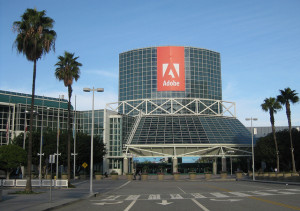
WiFi for the Con
Thursday, July 17th, 2008 Posted in Comic Con 2008, Computers/Internet | No Comments »I mentioned a few weeks ago that I want some sort of mobile internet access for San Diego Comic-Con so that I can post at least some stuff from the convention itself, instead of waiting until I get back to the hotel. Since the con has never offered wi-fi (except, IIRC, in the press room — which I just realized I could have used last year, since I got a press badge for CBR/Comics Should Be Good), I was looking into phone-based solutions.
Phoning it In
I experimented with post-by-email (not sufficient), with post-through-Flickr (slightly better, but only really suitable for image posts and still missing things like, oh, titles), and with using WPhone to provide a stripped-down admin interface in the hopes that my phone’s built-in browser could handle it (no such luck). No, I was clearly going to need a better web browser — one way or another.
Yesterday I went into a T-Mobile store, partly to look at the smartphones they had, and partly to ask about what data plan would allow me to use Opera Mini on my current phone. The guy tried to sell me a Blackberry, but I have to admit the Wing looked really nice, if expensive.
I asked about getting the Internet plan, and while the sales clerk was familiar with Opera Mini (he uses it on his own Blackberry), he was convinced it wouldn’t run on my RAZR V3t. I’d used an early version of it during a brief window in which T-Mobile allowed access even for phones with the T-Zones plan. But he seemed convinced there would be no point, so I walked out without having changed anything. 30 seconds of Internet searching reveals that yes, Opera Mini is in fact known to work on the RAZR V3t.
Free WiFi
Today, the news started making the rounds that the con will have free wi-fi everywhere except the exhibit hall itself, sponsored by the film, Eagle Eye. (Which, now that I think about it, is oddly appropriate and somewhat disturbing.) This is a huge relief, and makes the phone access much less critical. Though it would still be nice…
Sure, it’s going to be a very busy network. But I figure I’ll type things up in TextWrangler and load up the web just long enough to post. Gears will cut down on the amount of bandwidth needed for the admin interface. And I’ll save any serious emailing or forum visits for the hotel room. Actually, I’ll probably stay off the forums during most of the con, unless I have the opportunity to post “Hey, look what I just found out!”
Upgrade Priorities
Monday, June 23rd, 2008 Posted in Comic Con 2008, Computers/Internet | 2 Comments »TigerDirect keeps sending me ads for widescreen LCD monitors. I’d love to pick up a 22″ widescreen (right now I’ve got a 17″ LCD that runs 1280×1024), but my computer is in much more need of a mobo+processor upgrade. Especially since something on the system — and not the video card or the monitor — went bad recently and is preventing it from running at any resolution higher than 1024×768, leaving me stuck with a blurry screen on the monitor I’ve got. So I wouldn’t be able to take advantage of a new monitor anyway.
I’m putting that off mainly because I need to do make the time to research what I’m going to get. I’ve narrowed it down to a dual-core AMD, but then I have to balance which processor, motherboard, and memory to get.
Also, at this point, I may as well go 64-bit, which is going to mean reinstalling Fedora. Though in theory I should be able to run the 32-bit OS to start with, which means I could do the hardware upgrade one weekend, and the OS reinstall the next.
The other tech upgrade I’m desperate to get is a new phone. While my ideal phone doesn’t quite exist yet, I’d really like something with better mobile internet access than my RAZR V3T — particularly with Comic-Con coming up next month. They’re usually good at keeping you informed of scheduling changes (unlike Wizard World), but now that I’ve got SpeedForce.org, I’d like to be able to do at least minimal blogging from the convention floor rather than waiting until I get back to the hotel. Posting by email doesn’t cut it, and even with the WPhone Plugin providing a stripped-down admin interface, half the time the built-in browser tells me it can’t display the page. I may bite the bullet and pay T-Mobile the extra $20/month for a data plan so that I can run Opera Mini.
On the plus side, I’ve at least found a way to post photos directly using Flickr.
What I Want from a Mobile Phone
Friday, April 4th, 2008 Posted in Tech | 3 Comments »I want a phone with…
- The basics: voice, text, picture messaging and voice mail. (check)
- Bluetooth connection. (check)
- Easily transfer files to my Linux computer. (check)
- Working voice dial.
- A real web browser (Opera, Safari, etc., not just WAP).
- Wi-fi capability, at least for its internet access.
- A camera with at least 2 megapixels of resolution.
Those I can get; it’s just a matter of shopping around. (Well, looking at what T-Mobile has, since I’ve got over a year left on my contract) . But I also want:
- A camera that actually shoots good pictures. At least 3 or 4 megapixels, optical zoom, and can pick up color and detail in different light conditions.
- A music player with enough space to hold my entire music collection.
Admittedly, we’re getting into short skirt/long jacket territory at this point, but basically I want one device that can replace my phone, iPod, and digital camera. I’m tired of carrying around all three. At the moment, even the high-end iPhone only has 16 GB, which would just barely hold the music. And while phones are cramming more and more pixels into their cameras, they’re still using tiny, fixed lenses.
I’ve said before that I think the iPhone, or a comparable device, will catch up to what I want in 2010 or so. For now, I’ll have to raid the Batcave for a utility belt.
I can’t quite bring myself to get a Blackberry, but I keep looking at the T-Mobile Shadow. I’m a bit reluctant to run Windows on my phone, and really reluctant to run Internet Explorer, but it should be able to run Opera Mobile. And while the reviews seem to be good overall, they haven’t been impressed with the picture quality of the camera.
Well, one big purchase at a time. (It’s too early for me to get the full upgrade discount, anyway.) And who knows, a new phone that’s a better fit might be available in a couple of months when I’m ready to actually buy something.
Camera + Phone = ?
Wednesday, December 19th, 2007 Posted in Tech | No Comments »After looking at various smartphones (including the iPhone), I think I’ve figured out why I’m not satisfied with the camera features on any of them. They’re all phones that happen to feature cameras. I want a camera that happens to feature a phone.
Back to Basics: Phish by Phone
Friday, September 8th, 2006 Posted in Spam | No Comments »I just spotted a rather disturbing phishing message in (of all places) our abuse contact mailbox:
Subject: Fraud Prevention Measures
Dear customer!
Due to high fraud activity we constantly increasing security level both for online banking and card transactions. In order to update our records you are required to call MBNA Card Service number at 1-800-[removed] and update information on your MBNA card.
This is free of charge and would not affect any transactions with your card. Please note this is necessary to provide highest security level for all transactions with your card.
No HTML tricks. No links to fraudulent websites. Just a phone number.
I can only assume this is a response to high-profile inclusion of antiphishing features in Internet Explorer 7 and in Firefox 2. If there’s no website, there’s nothing for a web browser to check.
And of course by not using sneaky technical tricks in the message, it’s harder for tools like ClamAV, spam filters, or mail clients to detect.
Incidentally, does anyone else find it ironic that one of the most common phishing techniques is to exploit people’s fear of being phished?
Further reading: Anti-Phishing Working Group.
Just can’t win
Sunday, July 30th, 2006 Posted in Tech | 3 Comments »This is a story on phone menus, though it applies to anything where the user interface can change. I phoned in a refill on a prescription this morning. The phone system lets you choose when you plan on picking it up, presumably so that the pharmacy can prioritize people who are coming in sooner. Generally, it asks you to enter the hour, then #, then 1 for AM or 2 for PM.
I wanted to swing by around noon, so I entered 12, then #, and then without listening for the option, I hit 2. I wanted to pick it up around 12:00 pm.
So I was surprised to hear, “We’re sorry, the pharmacy is not open at midnight.” I flashed back to elementary school, when I was out on the field trying to explain to my friends why noon was 12 PM and not 12 AM as they insisted. Had someone managed to get into a programming position, without clearing that up?
As I re-entered the time, I listened for the options. It turns out that they had anticipated just such confusion, as after I chose 12, the option was, “Please enter 1 for noon, or 2 for midnight.” That works great for people who are using the system for the first time, whether they know noon is PM or not. Unfortunately, for people who have been using it for years and (normally) don’t need to listen to the options, it switches the buttons around. It’s like those WinZip registration dialog boxes that would rearrange the buttons every time, so that you couldn’t just click through, you’d have to pay at least some attention to it.
Of course, then there’s the question of why it even gives you the option for midnight…