Tag Archives: Opera

Losing Opera to WebKit

It still feels like an April Fool’s joke, but Opera is in fact switching to WebKit and discontinuing their own engine, Presto.

I can sort of understand. They can stop worrying about the long-running headaches of browser-sniffing websites that assume Opera can’t do things that it can. They can focus their efforts on the features they want to add or enhance, instead of maintaining their own separate codebase.

But here’s the thing: Throughout its history, Opera has served as a check against monoculture, against a single engine dominating the web too thoroughly. And now, it’s embracing the engine that dominates the fast-growing mobile web.

Remember the bad old days when people just wrote for Internet Explorer, and there was basically no innovation in web browser capabilities? It took Firefox’s success to turn the tide, but Opera was there, needling the industry with things like the “Bork edition” which turned the tables on browser-sniffing websites. Opera was a constant reminder that no, the web isn’t just Internet Explorer and Firefox, or just Internet Explorer and Webkit, or just two flavors of WebKit. That it was worth building technologies to leverage cross-browser web standards instead of picking the current 800-pound gorilla and feeding it even more.

There’s a real value in having different engines approaching the web in different ways, because it prevents stagnation. And there’s real value in having different engines use different code, even when implementing the same capabilities, because that means when a security flaw is found in one browser, it doesn’t apply to all of them. I go into this in a lot more detail in the old, but IMO still relevant article, Why do we need alternative web browsers?

The problem, of course, is that as much as I appreciate that role for Opera, it’s never really been their goal. Opera’s purpose is to sell web browser-related services. In the past, an open web was necessary to do that. Now, they’re throwing in their lot with the front-runner instead.

That leaves Mozilla, whose mission actually is to promote an open web, to go it alone. Apple and Microsoft certainly don’t care. And Google only really cares to the extent that their services are available as widely as possible. And when you get onto mobile, all three prioritize getting you into their particular silo.

Webkit browsers are a dime a dozen. The only ones that really matter are Chrome and Safari, and Safari is a lot more important on iOS. Opera will soon be just like Dolphin, Rockmelt and others that I have to rack my brains to remember. Maybe it’ll be enough for the company to survive, but it won’t be enough to keep them relevant.

Posted in Software | Tagged , , , , | 1 Comment

End of Opera Unite & Opera Widgets

Opera logo and Opera Unite logoThe Opera web browser has introduced a lot of cutting-edge features* over the years, many of which have since become standard in other browsers like Firefox, Chrome, IE and Safari. But they’ve also introduced features that didn’t catch on. With Opera 12, released yesterday, they’ve taken the first step toward removing Opera Unite and Widgets.

Opera Unite was a fantastic idea to move beyond the standard client-server model that dominates most internet activity and take peer-to-peer communication to the next level. Instead of relying on central servers like Facebook or MSN or Gmail, you could run a chat room, photo gallery or other application directly from your computer.

It never really caught on. If I were to guess why, I’d say that the big reasons were security concerns (turning your computer into a server!), the rise of easy-to-use cloud services, and the increasing move toward mobile computing. It’s one thing to let friends remotely browse a photo gallery from your home desktop that you leave on all the time. It’s another to have them view that gallery data from your iPad over your sketchy and bandwidth-capped cell connection.

As for widgets, they were sort of an odd thing to begin with: not quite applets, not quite extensions, and in competition with native widgets on both Windows and Mac OS that didn’t depend on having a browser open. (Though these days, when don’t you have a browser open?) Honestly, I’m still somewhat mystified as to why Opera created them in the first place.

Opera 11 introduced an extension system, and they’ve released a reference on converting widgets to extensions.

Widgets and Unite are still present in Opera 12, but turned off by default for new installations, and will be removed from a future release “before the end of this year.”

*I still disagree on the issue of tabs, on the basis that a tabbed interface is distinct from MDI.

Posted in Software | Tagged , , , | Leave a comment

Farewell, Xmarks Bookmark Sync!

It’s not a huge surprise, with all the major web browsers adding their own bookmark sync services, but Xmarks (formerly Foxmarks) is shutting down in January.

I figure I’ll just use Firefox Sync, Chrome sync, Opera Link, etc. to share bookmarks between the desktop and laptop, but what I really liked Xmarks for was its ability to sync different browsers together. I’m always switching between Chrome, Firefox, Opera and Safari (and occasionally IE when I’m on a Windows box) and it’s nice to have them all on the same set of bookmarks.

I guess it’s back to periodically exporting from my main browser and importing in the secondary ones, unless I find a tool or find the time to read up on the bookmarks formats and write one.

Posted in Web Browsers | Tagged , , , , , | 3 Comments

Check Your Plugins!

We can check your plugins and stuff

It’s a safe bet that your web browser uses at least one plugin, and probably several. Maybe it’s just Flash for viewing animations and video (think YouTube and Hulu). Maybe it’s Silverlight for watching Netflix, or Shockwave for playing games. You’ve probably got Java installed.

Just like your web browser, these plugins must be kept up to date or you’ll run into problems: missing features, instability, or (worst case) security vulnerabilities. Unfortunately, most plugins don’t update themselves.

Several months ago, Mozilla introduced a service called Plugin Check that will identify the plugins you have installed and tell you whether they need to be updated — and how to do it. At first it only worked on Firefox, but now it’s been expanded to all major browsers: Chrome, Safari, Opera, and even Internet Explorer.

It’s worth taking a few moments to check. Think of it as a pit stop for your computer’s web browser.

Posted in Web Browsers | Tagged , , , , , , , | Leave a comment

Webkit display:table-cell Problem

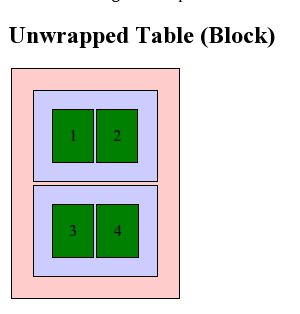
I recently tried to retrofit a mobile layout onto an old table-based site using CSS. It was a fairly simple layout: A banner across the top, two columns, and a footer. I figured I’d use CSS to “unwrap” the table and make the sidebar and main content area into full-width sections instead of side-by-side columns.

In theory this should be simple: CSS handles tables by using the display property and assigning it table, table-row and table-cell for the <table>, <tr> and <td> elements. You can assign these properties to other elements and make them act as tables, or you can assign block or inline to these elements and make the table act like a series of paragraphs.

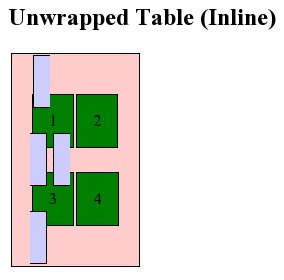
Initial testing worked perfectly in Firefox 3.6 and Opera 10.5x. Internet Explorer 8, as expected, ignored the changes entirely. Chrome, however, did something very strange, and Safari reacted the same way: The banner shrank, and the columns changed from a narrow sidebar to a 50/50 split…making it actually worse for small screens.

Clearly WebKit didn’t like something I was doing. Unfortunately, WebKit powers the exact platforms I was targeting: the iPhone and Android!

I dug around with the developer tools a bit to see if I could figure out what was going on. Was the browser not applying the property? Were the table cells inheriting the “original” property from somewhere else? Did I need to change properties on thead and tbody as well?

What I found was that WebKit did recognize the display:block I had added, but somehow the computed style was reverting to display:table-cell. This only applied to table and td, though. Table rows actually did what I told them to, which was why the result ended up looking bizarre.

If it hadn’t changed anything, I probably would have chalked it up to the capability just not being implemented yet. But since it worked on table rows, but not on cells, I decided to treat it as a bug in WebKit and went looking for the best way to report it. I ended up creating a WebKit Bugzilla account and reporting it as bug 38527.

Check out the testcase in Firefox 3.6 or Opera 10.5 to see what it should look like, then take a look in Chrome 4 or 5 or Safari 4.

Posted in Web Design | Tagged , , , , , , , | 5 Comments

What’s Cool in Opera 10

Opera IconAfter a long wait, Opera 10 is out! So what’s new in this first double-digit web browser?

Turbo

The biggest new feature is Opera Turbo, which can massively speed up web access on a slow network connection. Turbo takes the compression used for Opera Mini, which has to deal with slow cell phone networks, and brings it to the desktop. On fast connections you won’t need the proxy, but if you’re stuck on dial-up or sharing a busy network, it can help immensely.

I definitely could have used it on the painfully slow hotel wi-fi during Comic-Con!

Turbo can be turned on and off through the status bar, or set to auto-detect your network speed and switch on when it would help, and off when it’s not needed.

Speed

Even without Turbo, Opera 10 is a heck of a lot faster than Opera 9 was! The app itself is a lot snappier, it displays pages faster, and it responds quickly. Opera feels lighter than Firefox again, after the (comparatively) clunky 9.x series.

Web Fonts

Opera’s CEO CTO recommended embedding TrueType fonts with CSS in 2007, but Safari was the first web browser to support it in a non-beta release. Now Firefox, Safari and Opera can all download fonts as-needed. That means websites can use fonts that aren’t already installed on your computer.

Until now, if a designer wanted to use a font other than one of the standard fonts that come pre-installed with Windows or Mac OS, they had to save the text as an image. That’s fine for banners and the like, but a pain for anything that changes regularly…like headlines or content.

You can read more about web fonts at Mozilla Hacks, and see them in action at Speed Force (font write-up).

Site Compatibility & Features

Website compatibility has improved a lot, and Opera has continued to add support for newer technologies. It’s great to see Opera, Chrome, Safari and Firefox all working toward the next generation of the web. (If only Internet Explorer were along for the ride – at least IE8 has finally caught up with the last generation.)

Spell-Check

Opera has had on-demand spell checking for a while, though on Windows you had to install a separate dictionary. Now it’s built-in, and it’ll underline misspelled words as you type. (Downside: it underlines inside HTML code. I don’t really want to add “href,” “li,” and so forth to my dictionary.)

Unite Postponed

One thing Opera 10 doesn’t have that was introduced in the betas preview snapshots is Opera Unite, which lets you set up a presence on your computer that other people can see for file sharing, social networking, etc. Apparently they decided it needed more work and didn’t want to hold up the release.

But Wait, There’s More!

Some other new features:

  • Visual tabs: Stretch out the tab bar and see a thumbnail of each page you have open.
  • New e-mail client, including the long-requested ability to compose with formatting.
  • Automatic update.
  • Customize Speed Dial.
  • Web apps integration with web-based email and feed readers.
  • Improved developer tools (Dragonfly).
  • Opera Link: synchronize bookmarks, history, notes, etc. across multiple computers and phones. (Not new, but I think it syncs more types of data than it used to)

And a lot more.

As a reminder: Opera is free (as in beer). It has been for almost 4 years now, but it’s worth repeating because every once in a while you see someone who thinks it’s still pay or ad-based software.

Opera, the fastest and most secure web browser

Posted in Software | Tagged , , , | 8 Comments

Windows 7 Chart, Opera for Android, Chrome

Posted in Computers/Internet | Tagged , , , , , | Leave a comment

Oddities: Environment Ideas, Browser Bits…and Perry Mason

  • Top 10 Odd Environmental Ideas (Time via @ThisIsTrue). Some are disturbing, but I like the staple-free stapler. #
  • Aha! The 17 links that have been stuck in the linkcheck queue since yesterday are all to posts on the old Spread Firefox site. The archive’s locked. #
  • Spam: “Para legal information” from…Perry Mason. Wait, shouldn’t that be “Perry legal information?” #
  • Odd: Opera’s Reinvent the Web event is launching at midnight Pacific time? #

Posted in Spam, Strange World | Tagged , , , , , , | Leave a comment

Browser Sniffing Strikes Again!

As the first major web browser to reach a double-digit version, Opera has been testing out alpha releases of version 10 for months now. One of the early problems they encountered was bad browser detection scripts that only looked at the first digit of a version number and decided that Opera 10 was actually Opera 1, and therefore too old to handle modern web pages.

After extensive testing, they’ve concluded that the best way to work around this is to pretend to be Version 9.80. From now on, all versions of Opera will identify themselves as “Opera/9.80″ with the real version appearing later in the user-agent string.

For example:

Opera/9.80 (Macintosh; Intel Mac OS X; U; en) Presto/2.2.15 Version/10.00

This is similar to the way all Gecko-based browsers identify themselves as Mozilla/5.0, then list the real browser name and version number later on, which makes me wonder why they didn’t just stick with that increasingly irrelevant prefix — though I suppose any scripts looking specifically for Opera versions might have still picked up Opera/10 later on in the ID.

It’ll be some time before Firefox or Safari runs into this issue, but with Internet Explorer 8 in wide release, you have to wonder…what will Microsoft do when they get to IE 10?

Posted in Development, Software | Tagged , , , , , | 6 Comments

15 years of the Opera Web Browser

Origin of Opera: Comic StripHard to believe Opera has been around for 15 years. It’s only 14 since its first release, but 15 years ago two programmers started the project that became the Opera web browser.

I’ve been using Opera off and on for about 10 years. I think it was 1999 when a classmate showed me Opera 3.6, and how fast and small it was. (This was back when the installer fit on a floppy disk — and back when that actually made a difference.) I’ve followed it as they expanded from Windows onto Mac and Linux, onto high-end cell phones with Opera Mobile, and finally onto every Java-capable phone with Opera Mini. I’ve watched as they went from trialware to ad-supported to freeware business models. And while the desktop browser is no longer the speed demon it used to be, it’s been a consistent innovator in terms of both browser features and web capabilities.

So I’d just like to say: Happy 15th birthday, Opera! Just think, in a year, you’ll be old enough to drive!*

Happy 15th Brithday, Opera!

*In California, anyway. I think in Norway the driving age is 18.

Posted in Software | Tagged , , , | Leave a comment