Flocking from Netscape
Wednesday, April 2nd, 2008 Posted in Browsers | No Comments »
When AOL first announced they were discontinuing Netscape, they recommended Firefox (a logical choice for many reasons). Since then, they’ve also started heavily promoting Flock—to the point of offering seamless upgrades from NS8 to Flock. (In theory, anyway; I fired up the copy I had for testing and couldn’t get it to do anything but update to the most recent 8.x version. Confirmed. I let it sit open in the background for a while, and it eventually popped up the offer for 1-click Flock migration.) Netscape 9 has an update notice that offers to download Flock or Firefox.
The key issue, of course, is moving as many users as possible from a discontinued browser—there’s no doubt that security holes will be found in it over time—to one that is actively maintained.
Why Flock, specifically? Well, sticking with the same toolkit and user profile makes migration easier, so that narrows the field to Firefox and Flock. (Not sure about SeaMonkey’s profile.) Since Netscape 8 and 9 were big on integrating with websites, Flock’s “social browser” seems a slightly better fit. And it turns out most of the Netscape 8 team went on to build Flock. Talk about social networking!
Behind the Times
Friday, December 28th, 2007 Posted in Browsers, Opera | 1 Comment »I’ve been meaning to post these photos for a while now, but with the discussion on Netscape’s impending doom, I should post them now.
Back in February, I was wandering the aisles at Micro Center and noticed a couple of odd software titles on the shelf:
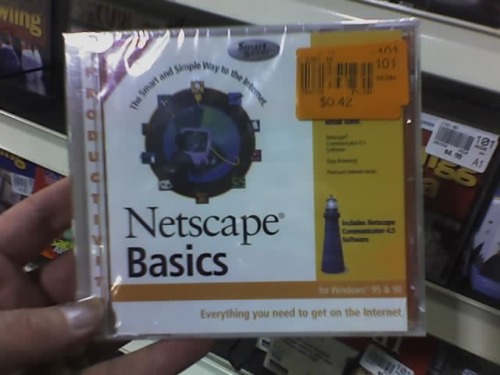
- Netscape Basics, a jewel-cased CD-ROM which contained Netscape Communicator 4.5 and boasted compatibility with Windows 95 and Windows 98.
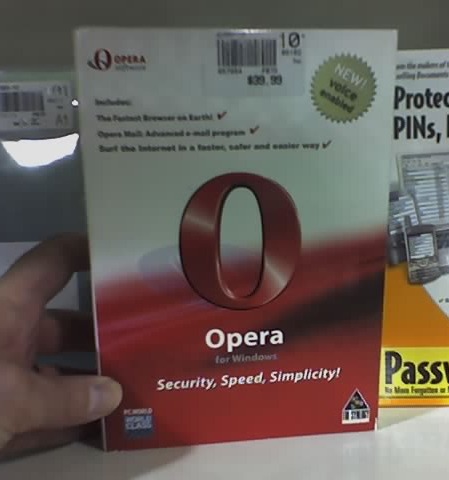
- Opera for Windows, a boxed copy of I forget-which-version, but judging by the “New! Voice Enabled!” badge, it’s probably 8.0.
Keep in mind that this was February 2007. So that was an 8-year old Netscape box, and a 2-year-old Opera box. Netscape had been free for 9 years, and Opera had been free for 1½ years.
Someone had sensibly marked the Netscape CD down repeatedly, ending with a price tag of $0.42. I was half-tempted to buy it just to prove that I’d found it, but decided taking a picture would be better, since it wouldn’t clutter up my desk. Incredibly, no one had thought to mark down the Opera box. They were still asking $39.99 for it.
Did I mention pictures?
Farewell, Netscape!
Friday, December 28th, 2007 Posted in Browsers | 1 Comment »
It’s been a long time coming, but AOL has officially decided to shut down the Netscape web browser. The final security updates for Netscape 9 will go out in February, and then that’s it.
It’s been on life support for a while now, as AOL has tried repeatedly to revive it. After they dismantled the Netscape team in 2003 (just before spinning off the Mozilla Foundation), everyone expected that would be the end, but they came back with a surprise update, Netscape 7.2, the following year. Then they hired an outside company to reinvent it as a mash-up of Firefox and Internet Explorer, producing the Netscape 8 chimera. And just a few months ago, they went back to the well and released the Firefox-based Netscape 9, trying for the Flock model of integration with social networking sites…but only integrating with their own.
So what killed it? Netscape was arguably the pioneer, building on Mosaic’s success to create the first widely-used browser on the fledgling World Wide Web.
- Internet Explorer being pre-installed on every Windows desktop
- The commercial-to-freeware transition. Back in the 1990s, the only business model for giving away a free web browser was to subsidise it with revenue from other products. This led to selling the company to AOL, and opening the source code.
- The missing Netscape 5. IE5 was considerably better than IE4, and arguably better than Netscape 4 in some areas. And Netscape didn’t have a new version to compete, because…
- The transition to open-source took a lot longer than expected, leading to…
- The disastrous Netscape 6. While there’s something to be said for meeting deadlines, Netscape 6 was a prime example of why not to release early. The program just wasn’t ready (Mozilla actually declared the code to be 0.6), and it turned off many users who might otherwise have stuck around a little longer for a stable release.
- Fundamentally, though, AOL never seemed to know what to do with it. Is it a product? An exploitable brand name? A threat to brandish during contract negotiations with Microsoft?

It’s interesting that, as I made this list, I realized that the transition to open source really didn’t help Netscape, the company. But it led to the formation of the Mozilla Foundation and the release of Firefox, one of the most visible open source success stories out there. The company and brand name withered, but the code itself flourished.
Like the demise of IE/Mac, it’s more of a symbolic end than one of substance. In my opinion, the true “heir” so to speak of the early Netscape has been Mozilla, and now Firefox, for quite some time.
Update: Asa Dotzler has a somewhat less nostalgic take on the matter, as well as a link to commentary at TechCrunch. I can’t believe I forgot to mention the crippling/crufting of Netscape 6-7 as compared to Mozilla.
Update 2: More comments at Slashdot. Gee, I wonder who submitted that story?
Update 3: Some commentary from the Web Standards Project, with a somewhat familiar-looking title.
More Netscape 8 Nuttiness
Wednesday, May 25th, 2005 Posted in Computers/Internet | No Comments »Q: What happens when you break up/fire your web browser-developing group with years of experience, and later hire an outside firm to build your next product?
A: Netscape 8.
IEBlog has an amazing report—which I’ve just verified. Netscape 8.0.1 disables IE’s XML rendering. So if you try to load an XML document—say, an XSLT-styled RSS feed like the feed for this blog—using Internet Explorer or Netscape 8 with IE’s engine, you’ll see either a blank page or an unloaded-image icon.
Apparently every time Netscape 8 runs, it trashes a registry entry that defines how IE displays XML. At this point the only way to fix it is to uninstall Netscape 8 and delete that entry (directions at the above link).
This raises two questions:
- Why does Netscape 8 alter an Internet Explorer registry setting?
- Why can Netscape 8 alter an Internet Explorer registry setting?
I’ve said it before (though possibly not here), but Mozilla is much better off now that AOL isn’t calling the shots.
Update June 20: Netscape 8.0.2 fixes this problem.
Updating Netscape—the old-fashioned way
Tuesday, May 24th, 2005 Posted in Annoyances, Browsers | No Comments »People have justifiably criticized Firefox’s update system. It’s nowhere near what anyone wanted for 1.0, and it’s apparently a priority for 1.1. But for all its faults, at least they managed not to release a browser with publicly-known security vulnerabilities* to immense fanfare, then release a fixed version a day later—without any fanfare I could see—the way “Netscape” did.
Six days later, my copy of “Netscape” 8 still hasn’t noticed that there’s a critical security update available, even when I tell it to check. Fortunately I’m not using it for everyday browsing, since I just grabbed it out of curiosity. I finally gave up and downloaded 8.0.1, just in case I forgot about it later.
*Just as Netscape 6-7 were based on Mozilla, Netscape 8 is based on Firefox. Netscape 8.0 was based on Firefox 1.0.3, which contained a pair of security bugs that had already been fixed in Firefox 1.0.4. Given that the holes were widely publicized on May 7, Mozilla released a fix on May 12, and AOL released Netscape 8.0.1 on May 20, I don’t see why they couldn’t have incorporated the fix for the May 19 release.
Multi-Engine Web Browsers
Friday, March 4th, 2005 Posted in Browsers | No Comments »The WaSP Buzz points out that Netscape 8’s ability to switch between IE (Trident) and Mozilla Netscape (Gecko) isn’t exactly new: Maxthon apparently does this already. Maxthon is essentially Internet Explorer on steroids, and since I’d rather use Firefox anyway, I’ve never tried out any of the browsers that wrap a new user interface around IE.*
MozIE has a similar ability, but is aimed squarely at web designers: it gives you two panes, one embedding IE and one embedding Gecko, and synchronizes the views. You get a side-by-side comparison of how each browser will display your page.
And a few years ago, Konqueror could switch between KHTML and Gecko. I’m sure it still can, and the only reason I don’t have Mozilla in my list of alternate views anymore is that I didn’t install the relevant bindings, or Fedora Core stopped including them in their KDE packages.
Is it new? Of course not. But this is Netscape. It’s kind of like Apple deciding to ship all new Macs with Virtual PC and Windows XP pre-installed. Or maybe France making English a second official language.
*My main interest in trying out different browsers is to see how they display websites. In theory, Maxthon and any other browser of its ilk should be identical to IE in this respect.
Trusted Site, Untrusted Browser
Thursday, March 3rd, 2005 Posted in Browsers | 1 Comment »I installed the just-released Netscape 8 Beta. It imported most of my settings from Firefox, including bookmarks, cookies and even history. One of the first things I always check with a new browser is how it identifies itself, which in this case is as Firefox 0.9.6. (Presumably they’ll get on this by the time the final version is out.)
First impressions: importing was clean and worked well. UI is a bit freaky, as things are spread all over the place—like the main menu, which is in the upper right and in line with the title bar instead of where the menus are on every other Windows application. The multiple toolbars seem confusing at first (it took a while to dig up my bookmark bar, for instance). Then I looked at the site trust/rendering choices, the big exciting feature of this release. And I’m not impressed. Or rather I am, but not favorably.
The current tab shows a shield icon indicating the trust level of the site: Green if it’s been verified by a “Netscape Security Partner,” yellow if not, and I would presume red if it’s a known phishing/virus/etc. site. There’s also an icon indicating the trust level: a check mark if it’s trusted, an ellipsis for “not sure” and an exclamation point for not trusted. Unverified sites are, by default, in the “not sure” category. So far this makes sense.
Clicking on the shield icon opens a site controls dialog box enabling you to choose to what extent you trust the website, and below that, whether to display the site using the Mozilla Netscape or Internet Explorer engine: Read the rest of this entry »
Netscape: Re-Clutter the Web
Tuesday, November 30th, 2004 Posted in Browsers | No Comments »CNET has posted a write-up of AOL’s new Netscape prototype based on Firefox, as well as a screenshot. It seems to be a combination of Firefox + theme + bundled extensions… plus a mode that embeds Internet Explorer for compatibility.
There are some nice ideas: adapting Firefox’s RSS capabilities to create a headline ticker, for instance, and the Firefox team has been talking about bundling extensions since it was called Phoenix. As for the embedded IE mode… on one hand it provides a convenient solution to the biggest criticism laid on all non-IE browsers: they don’t render pages exactly the way IE does. But it comes at the cost of all the security risks inherent in IE itself. It does remind me of the “View with Gecko” option Konqueror used to have (and probably still does on some systems).
But the clutter… The sheer number of buttons, icons, widgets etc. in that screenshot is staggering. Even after installing the web developer extension I don’t think I have that many buttons on Firefox. 3+ buttons on the tab bar, 3 icons on each tab…. I hope that CNET was just enabling every feature they could find to get them all in one screenshot, but if AOL is trying to bill it as “easier” than Firefox (which was created with a simple user interface as a design goal), they’ve got to try another approach.
Update (via WaSP): It seems BetaNews has more information on the dual-engine setup. Apparently they do have security settings to mitigate the IE issues… but then so does IE, and we all know how well that’s worked. Also, another screenshot, which looks even more cluttered than CNET’s. I think this will be a browser that requires you to run it maximized at 2000×1500. (Also of note: Firefox developer Blake Ross’ Open Letter to Netscape and Henrik Gemal’s collection of screenshots.)
Further Update: MozillaZine has posted a more thorough review.
Netscape Returns!
Tuesday, August 17th, 2004 Posted in Mozilla | 2 Comments »Well, it’s official. After months of rumors and vague announcements,
Netscape 7.2 has been released!
It’s been just over a year since AOL closed down Netscape and spun off the independent Mozilla Foundation. Despite the uncertainty of that transition, no one can deny that Mozilla has flourished. People everywhere are switching to Firefox and recommending it on security, usability, and capability grounds.
It’s really quite surprising, particularly since Netscape the company no longer exists. But Mozilla has been marching ahead, and all that stood between AOL and an updated Netscape was updating their proprietary features, like the AIM sidebar and access to AOL email, to work with the new Mozilla code.
For the past year, I’ve been advocating that people switch from Netscape to Mozilla, since it seemed the best upgrade path. (Someone on Mozillazine pointed out that AOL is actually promoting the Mozilla connection — an interesting switch.) I’ve been skeptical about the new version actually materializing, but here it is.
I’m going to stick with
Firefox myself, but for Netscape fans and those looking for the full browser suite (complete with AIM/ICQ)…
Simple drop shadows? IE/Win and NS4 don’t think so!
Friday, June 11th, 2004 Posted in Annoyances, Web Design | No Comments »I found myself thinking of A List Apart’s CSS Drop Shadows, and decided I’d modify my writing portfolio to use actual drop shadows instead of the clunky border mess I’ve had for the last few years.
The first thing I realized was that the technique isn’t suitable for large, arbitrarily-sized regions, because you need to have a background image as large as or larger than the area being given the shadow. When you’re trying to apply it to most of the page, you need a multi-thousand pixel image. That’s not only hard to work with, but even if it compresses well it’s still going to take up a lot of unnecessary room in the browser’s memory.
I wanted to keep the markup simple, so I shopped around a bit more and came across a CSS drop shadow example at W3C which was very simple: all you do is put a shadow-colored div behind the area and mess with margins.
Well, that worked great in
Mozilla,
Opera,
Konqueror and
Safari. Then, the dreaded
Internet Explorer test.
Read the rest of this entry »


My Amazon Wishlist