Tag Archives: G1

Mobile Web Layouts vs. the Viewport

A few years ago, I tried to give some of my most-used websites a nice, clean look on mobile browsers by adding a stylesheeet with the “handheld” type. Then the iPhone came out and ignored them, and everyone copied that behavior, making it useless.

Somewhere along the line, I revisited the same CSS techniques, but used the “max-width” media query to change the layout on smaller screens. This seemed even better in the long run, since screen size matters more than whether a device is a desktop computer or a handheld computer. (The iPad was nothing but a long-standing rumor in those days, but demonstrates this clearly.)
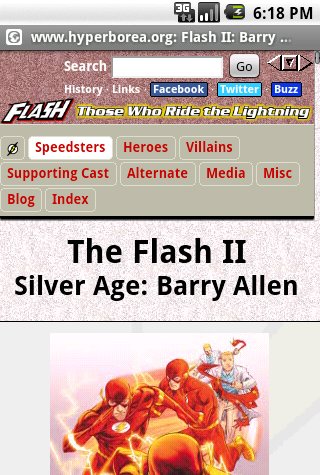
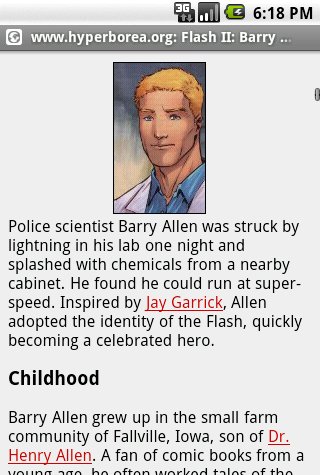
The raw screenshots (click to view) are slightly larger, but since mobile devices often have denser screens, if you’re reading this on a desktop, it’s probably about the same physical size.

That worked great on the iPhone, and on the G1, which I updated through Android 1.6. I stopped testing it after a while, and no one commented on it, so I figured it was still working. (Reminder to self: that’s always a mistake.)

Last week I got a G2, which came with Android 2.2. Last night I visited one of my websites, and was presented with this shrunken, unreadable mess…because Android doesn’t actually use the real screen size anymore. It pretends it has a bigger screen so that it can present a desktop-like view and then let the user zoom around. Mobile Firefox does the same thing.
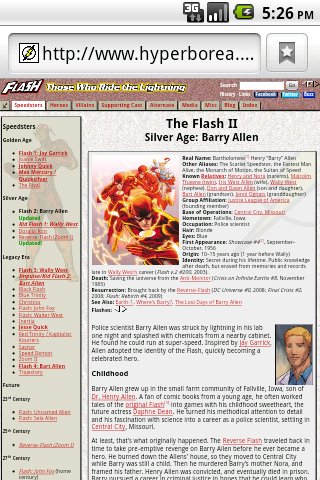
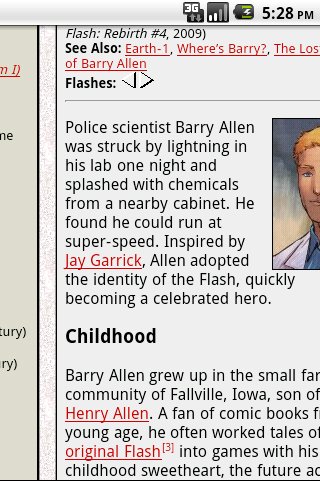
<rant>Why is it that every time I find a clean technique to use the same markup on both desktop and mobile devices, some browser manufacturer decides to bypass it in favor of giving the user a clunky imitation desktop view instead of one optimized for their experience?</rant>

*ahem*

Anyway, it turns out it’s possible to fix this problem with the <meta viewport tag> as shown here:

<meta name="viewport" content="width=device-width">

So I can provide nice, clean small-screen layouts again…after I add extra markup to every single page that uses these stylesheets.

Problem solved!

Well, almost. It fixes the layout…but it also prevents the user from zooming out for quick scrolling, which can be awfully useful on a long page.

Screenshots of the Barry Allen Flash profile, taken using the Android SDK emulator with stock Donut and Froyo images.

Posted in Annoyances, Web Design | Tagged , , , , , | Leave a comment

Android Stops Syncing When Low on Space

A few months ago, my phone stopped syncing contacts and messages (including missed-call and voice mail notices!) after I installed a new app. Email and text messages flooded in the moment I uninstalled it. At the time, I figured it could be the app, or it could simply be that the phone doesn’t sync if it’s low on space.

Now I know: It’s the lack of space.

Last night I updated Gesture Search, which pushed the phone into low-space territory. I figured I’d deal with it later. This morning, I noticed that it wasn’t reporting new messages on Gmail. Reluctant to uninstall any more apps, I followed Katie’s suggestion of clearing out old text messages…and freed up 1.5 MB. (I figure it’s the pictures. They’d better be worth 1,000 words, because they take up a lot more disk space.) A few seconds later, the @ popped into the notification bar.

You’d think that 7+ MB would be plenty of room to download email and text messages, or tell the notification system to pop up a new icon. As near as I can tell, though, if the “Low on Space” icon is visible, Android won’t sync anything.

Next time, I’ll make a point of cleaning things up quickly.

With luck, this won’t be a problem with my next phone. (Yeah, I’m still on the G1.) Whether I go for a Samsung Vibrant, a G2, or something else, it should have more storage on the phone and the ability to install apps to the SD card.

Posted in Computers/Internet, Troubleshooting | Tagged , , , | Leave a comment

G1 Sync & Texts Blocked? Check Your Apps!

Sometime last week I noticed that I hadn’t received some alerts sent by text message to my phone. I figured it was probably a transient problem with the email-to-SMS gateway and didn’t think much more of it. Then on Sunday I added a contact to my address book in Gmail, and it still hadn’t synced to my phone a half-hour later. Again, I figured it was just a hiccup.

Yesterday, some more email-to-SMS texts vanished into the ether. I figured something must be up with the gateway, so I changed the alerts so that they would also send to my Gmail account, figuring that if the text messages failed, I’d still get a notice.

They didn’t show up either.

That’s when I realized that nothing on the phone was actually syncing: Not Gmail, not the contacts, not the calendar…and it just wasn’t receiving text messages at all.

I tried turning sync off and back on, manually syncing, restarting the phone (both a hard reset cycling the power and a soft reset, sort of the Ctrl-Alt-Delete equivalent using the green, red and menu buttons together), even clearing all the local data for Gmail, Gmail storage, and Calendar storage.

Well, none of that worked. It marked all the apps for syncing, but wouldn’t actually start.

So it was time to backtrack: What had I changed recently?

Well, I’d updated several apps. Off the top of my head I could think of Twidroid Pro and the Weather Channel, but I couldn’t remember what else.

I’d also installed a new app, Layar, an augmented reality app which I’d seen in an ad for some other phone last week, but hadn’t actually gotten around to trying out. Adding it triggered a low space warning, but the phone still had 6.8 MB free, which ought to have been plenty.

Curiously enough, the last successful sync was right around the time that I installed Layar. Hmm…

Okay, what the heck. I uninstalled it. Within seconds, the phone bleeped and picked up the test messages I’d sent to Gmail. Within a minute, several text messages arrived, including my test from this morning and two alerts from last night.

Well, that was certainly suspicious.

So I installed it again, and this time actually opened the app to try it out (making it display the location of pizza places as seen from my desk), and sent myself a test message at Gmail. I can’t say I was surprised when the test message showed up on my desktop, but not on my phone, even when I manually refreshed my inbox in Gmail. Within a minute of uninstalling the app again, the message showed up.

So, no Layar for me. I don’t know if it doesn’t work with the G1, with Android 1.6, or with something else I have on the phone…or if it’s not Layar at all, and the phone just needs more space to sync.

The message is clear, though: If your phone stops syncing, or stops receiving text messages, look at what’s changed. There’s a good chance that the problem is related.

Update: It’s been about half an hour, and the voice mail notice just popped up…for a couple of messages I received on Sunday! It looks like the problem was blocking everything that used the standard sync/notify system on the phone. Twidroid was working, so I guess it must use its own system.

Update 2: I’ve confirmed that it’s just the low space, not the particular app, that causes the problem.

Posted in Computers/Internet, Troubleshooting | Tagged , , , | 1 Comment

G1 Will Get Android 2.1 After All

Android and Me is reporting that all Android phones in the U.S. will get Android 2.1 updates — even the G1 — but that they may be missing some features and some models will need to be wiped as part of the installation.

That makes sense, because it would allow developers to reassign some of the space set aside for over-the-air updates and use it for a larger system instead — and maybe more space for apps.

The possibility that the G1 was headed for obsolescence before my 2-year contract was up didn’t bother me much at first, but I’ve watched as even Google has released high-profile apps that required Android 2. Sure, I doubt the hardware can handle Google Earth, and Buzz turned out to be a dud, but they’re signs that Android 1.6 isn’t going to cut it for much longer.

If it does require a wipe and re-install, I can deal with that. A lot of the key data is either synced with the cloud or stored on the SD card. With luck, T-Mobile and HTC will build a decent backup and restore into the process and I won’t have to reinstall all my apps, bookmarks, etc.

Update August 2010: This is looking less and less likely as time goes on.

Posted in Computers/Internet | Tagged , , , , | 6 Comments

Why Google Buzz Won’t Run on Your Android Phone (Yet)

I’ve been hoping to try out Google Buzz, but it hasn’t hit my Gmail account yet and it won’t run on my phone*…even though it’s a web app. Comments at Android and Me and at Mashable show that I’m not alone.

It turns out that Buzz uses HTML5 features (specifically appcache, database and location) to store local data and to detect your physical location…and those capabilities were added in Android 2.0.

The support thread mentions that they are “working on another version that will make Buzz for mobile accessible on older Android OS versions (and some other smartphones as well).” The browser in Android 1.6 and below supports similar capabilities through Gears, so they may be planning a Gears-based workaround.

This would be a lot less of an issue if it weren’t for the fact that most of the Android phones out there still run 1.6 or even Android 1.5. IIRC only the Droid and Nexus One have officially been updated to 2.0 so far**, so unless you have one of those two models, you’re more likely to get Buzz to run on an iPhone than Android.

Funny, that.

*I’ve got a G1. It can only access Buzz through the updated Maps app, which brought up a bunch of people in nearby office parks posting things like “Testing Buzz” and “WTF is Google Buzz?”

**A few other phones have had updates announced, but I don’t think any have actually shipped yet. I could be wrong.

Posted in Computers/Internet, Troubleshooting | Tagged , , , , , , , | 2 Comments

Android Browser Using Extra Space? Check Gears!

I finally found out what’s been taking up so much space on the Android web browser on my G1: Gears!

Whenever the low-on-space warning* icon shows up on the phone, I open up the list of applications. Then I sort it by size, look for the largest apps that I don’t use anymore, and start uninstalling.

“Browser” is always high on the list, but it’s all data. While I could free up the space by telling it to clear everything, I want to hang onto things like bookmarks. Each time the icon popped up, I’d go back to the app, open up More and then Settings, and clear the cache, or the history, or cookies**, one category at a time.

Then I’d go back to the App list and it would still be using up several megabytes of space.

Yesterday, it occurred to me to check the Gears settings. Months ago, I’d set up two WordPress blogs with Turbo mode, which uses Gears as a permanent cache for the admin area. It’s great on a desktop or laptop with lots of local space and a slow or flaky Internet connection. But it wasn’t helping me much, because…

  • WordPress Turbo Mode is only really useful if you use the rich-text editor, which I don’t.
  • On the phone, I rarely manage either blog through the browser anyway. I usually use WordPress for Android (formerly wpToGo).
  • The files it stores take up a whole megabyte — per blog! (possibly more, depending on how the file system stores them.)

So I removed both sites from Gears, along with a couple of other sites that I’d added, but didn’t need anymore, and freed up about 3 MB.

It should be a while before I see that low-space icon again, and I shouldn’t have to ration my installed apps quite so closely!

*This wouldn’t be a problem if they’d given the G1 enough memory for apps in the first place, or if they’d let us install apps to the SD card (where I still have gigabytes of free space), or if I were willing to root my phone, or if I’d just bite the bullet and buy a Nexus One.

**I’d really like to be able to selectively delete cookies — or rather, to selectively keep a few cookies and delete the rest — but that’s another issue.

Posted in Troubleshooting | Tagged , , , , | Leave a comment

CDN Breakdown=Bad. Best Buy Mobile Site=Good

One minor rant, and one success story, sort of connected.

The rant: My internet connection is acting kind of flaky tonight. Actually, the connection is fine, but it isn’t talking to some content delivery network(s). All the small-time websites load perfectly, but a lot of the larger ones either aren’t loading at all or are taking ridiculously long. I can load the Facebook timeline, for instance, since that’s dynamically generated…but it took 20 minutes for it to load a handful of static 16×16 pixel buttons for things like sharing links. *grumble*

On the other end of things, I had a great experience with Best Buy’s mobile website earlier today. I’m not sure I’ve ordered anything from BestBuy.com in years. The last thing I can think of was my first decent digital camera…in 2003. Usually if I’m going to buy from them I just walk into the store.

Meanwhile, despite owning my G1 for almost a year, I’ve never actually used it to buy anything that I can recall. Lots of research (ShopSavvy, plus various stores’ websites), but no actual purchases. I decided I wanted to see if I could place an order using just my phone, and it was extremely easy to:

  • Find the item
  • Add it to the cart
  • Select a store for local pickup
  • Update my billing address
  • Place the order

The only real sticking points were:

  • Store locations only listed cities. Fortunately, I could just hit a “map” button and they loaded in the phone’s Google Maps app.
  • I had to reset my password, since it had been so long. Since I have POP access to that account, that meant waiting a few minutes for the whole mailbox to download before I could open the message with the new temporary password. Then I had to write it down because K-9 doesn’t seem to support copying text from incoming mail.

Other than that, everything was not only possible using the Android browser, it was streamlined. If I hadn’t needed to update my address and reset my password, I could have been done in two minutes flat. Maybe three once you factor in typing in the credit card info.

I had a harder time posting a link on Facebook tonight — on my desktop — than ordering something on my phone!

Posted in Computers/Internet | Tagged , , , , , , | Leave a comment

G1: No Android 2 for You!

Okay, I get it. By buying the first device of its kind (i.e. an Android-powered smartphone), I’m an early adopter. In a sense I was helping out in a massive public beta as Google, mobile phone carriers, and handset manufacturers worked out the kinks in the design and realized things like, “Oh, we really do need more memory than that, don’t we?”

But it’s still annoying to read the early reports that Android 2.0 “Eclair” won’t fit on the G1.

We have done this dance before, when rumors surfaced that the G1 wouldn’t be able to handle Android 1.6 “Donut.” Fortunately, engineers managed to squeeze it into the space available, and T-Mobile sent out Donut as an OTA (over the air) update to MyTouch and G1 devices alike. But I’ve had time to think about the issue, and my thoughts basically come down to this:

  • New software eventually reaches a point when it can no longer support old hardware. You can’t run Snow Leopard on a G4 or Windows 7 on a Pentium II.
  • When the hardware is usually tied to a fixed-term service contract (in this case, 2 years), the provider really ought to fully support it for the length of that contract. The G1 launched 1 year ago with (in most cases) a 2-year contract.
  • Even if this is the last major update, my phone is still better now than it was when I bought it.

It will be very nice if history repeats itself, and Google and/or T-Mobile finds a way to cram Eclair onto the G1. Even if it means dropping the convenience of OTA updates and instead requiring you to download it to a PC and update over a USB cable. More likely, though, they’ll freeze the G1 on Android 1.6 except for bugfix and security updates, and it’ll be up to unofficial distributions like cyanogen to bring a newer OS to the older phone.

Because I don’t really want to mess with rooting my phone and installing a third-party distribution, if this is the end of the line for the G1, well…Android 2 has some really nice features that I’d really like to be able to use, but nothing that screams “must have!” The only real worry I have at this point is that app developers might start requiring newer versions of Android.

The other option: buy a newer phone. I’ll probably want to do that anyway in a year or so, but I’m not there yet. It still feels like I just got this one.

Update (February 26): It turns out the G1 will get Android 2.1 after all, but will probably require wiping the phone. That makes sense, because it would allow developers to reassign some of the space set aside for over-the-air updates and use it for a larger system instead — and maybe more space for apps.

Posted in Annoyances, Computers/Internet | Tagged , , , | 7 Comments

Android FTW!

  • Wasn’t aware there was a Sidekick outage. My T-Mobile G1 has been working just fine. Score one for Android! #
  • Wasn’t planning to have a donut today, but T-Mobile just sent Android 1.6 to my phone. #

I’ve had this phone almost a year now, and it’s actually a better phone now than it was when I bought it! How cool is that?

Posted in General | Tagged , , , , | Leave a comment

Smartphone Radiation

Wow! Glad I didn’t move to a MyTouch! The G1 isn’t in the Top 10 Radiation-Emitting smartphones list, but it’s not exactly low either. # The MyTouch, on the other hand, is #1.

Posted in Computers/Internet | Tagged , , , , | Leave a comment