
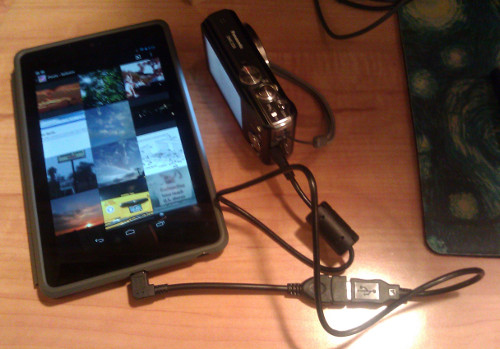
All right! I’ve verified that my Nexus 7 can read photos from my camera!
The tablet supports a subset of USB OTG (On The Go), which also lets it connect to keyboards, mice and external storage. It only has a micro-USB port, which means I had to get a $1 USB cable adapter, but for that price? Big deal.
If I put the camera in PTP mode, it can import directly to the gallery. If I put it in PC mode, I can use the Nexus Media Importer app. And I can use FlickFolio to upload multiple photos to Flickr at once.
The next time we go on vacation (OK, the next time we go to Comic-Con — I don’t mass-post vacation photos during a trip), I won’t have to hog the laptop just to upload photos!
This is something I’ve wanted the ability to do for a long time, since before Apple redefined tablet computing and I was considering getting a netbook. And unlike a netbook, which I would have only used while traveling, I use the tablet every day.
On the downside, even though I won’t be competing with Katie for laptop time, I’ll be competing with J for tablet time….
Photo: Why I still need a good camera in addition to my phone. OK, that’s a bit of an exaggeration: The phone isn’t really that bad when used under good lighting, or with the flash (though the Lumix is a lot better, and has an awesome optical zoom). It’s just that the picture with the flash, while sharp, showed the smudges better than the images on the screen.
How come I can’t find either of the apps you mentioned here? My Nexus 7 just got auto-updated, maybe that’s why? I wonder…
Odd, they both show up for me, and my tablet has also updated to 4.2. Admittedly I already had the apps installed, but the web version of the Play store still shows both as compatible.
I have a kindle fire 7hd, is this compatible with the USB cable adapter used with the Nexus 7. I would like to transfer pics from my camera directly to my kindle without using my laptop.
The cable should be fine. The question is whether the Kindle Fire supports USB OTG. A quick Google search suggests that the hardware supports it, but the Kindle version of the OS might not. Though if it’s anything like the situation with stock android, you might be able to find an app for it. Good luck!
Of course these days you can get a Wi-Fi-enabled camera and transfer photos to your phone, tablet, or an online account over the air. But if your old camera still works fine, this method can still be useful.
And there are a lot of other things you can do with a USB connection — access a portable drive directly, or hook up a keyboard or a mouse. (I showed J. how to hook up a mouse to a tablet the other day and he wanted to bring it *everywhere*, just like he wanted to use the Bluetooth keyboard everywhere for a while, even though all his games are touchscreen-based.)
I like the fact that USB-OTG is more common now than it used to be, and the shift toward USB-C (where the connector is the same at both ends) will make it more convenient by eliminating the need for an adapter.